Hello,
Good news today
We have several more circuit network improvements to share with you today.
The Boiler type entities can now be connected to the circuit network, which makes it super easy to set up backup or emergency power conditions.
You will also notice the beautiful new Heat exchanger graphics and working animation by Zsolti.
Land mine was less of a "Why?" and more of a "Why not?"... but it makes itself quite useful as a tripwire or enemy detector.
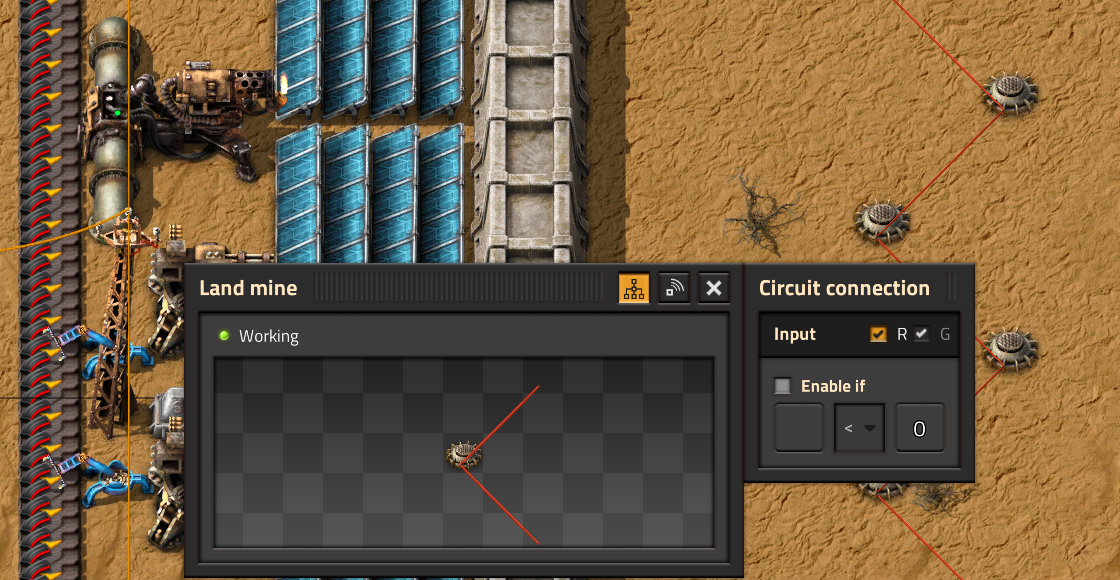
Since the Land mine doesn't do any friendly fire, you can't quite use it to troll your friends unfortunately (though I admit it would be pretty cool to wire up a whole factory self-destruct switch).
In a previous post (FFF-441), we showcased the new Space platform set requests.
In that we said: "It is also possible to use 'Set requests' at the same time as 'Read contents', due to a little bit of magic
self-subtraction.".
This topic generated some discussion about the problems of the magic self-subtraction, and possible solutions.
And we are happy to say, we did figure out a solution that should make the circuit network a bit more understandable and also mean we can remove the magic logic: Circuit Inputs and Outputs can be directed to different wire colors.
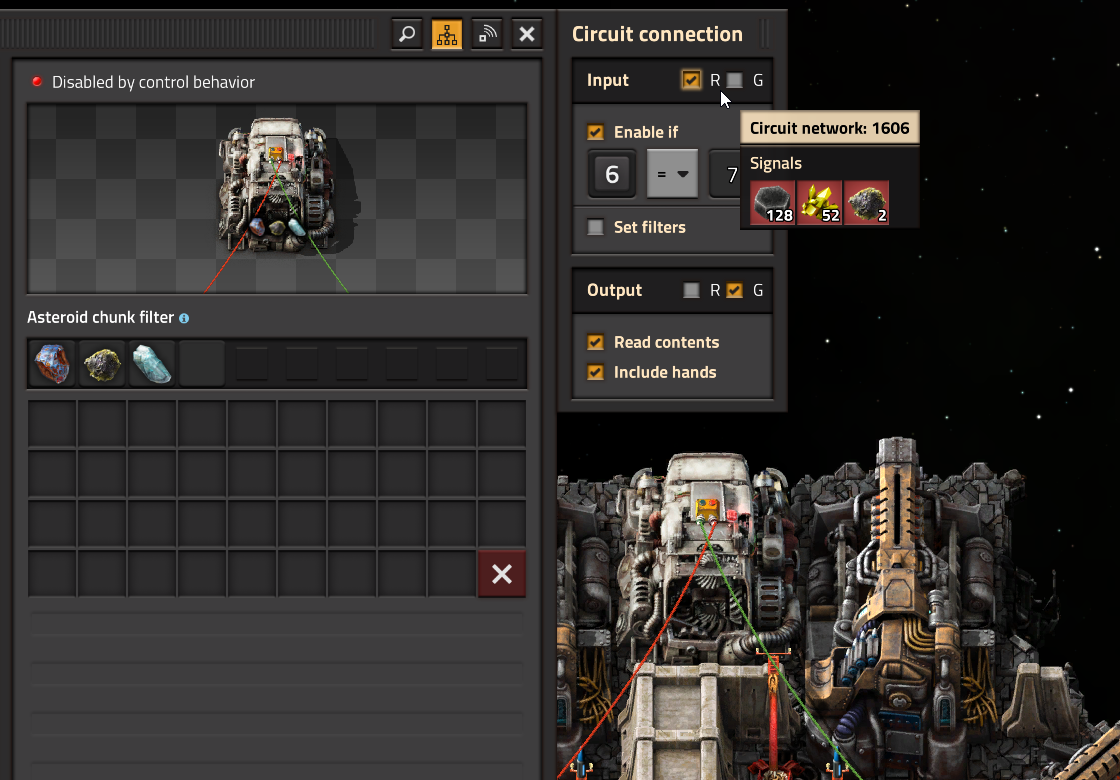
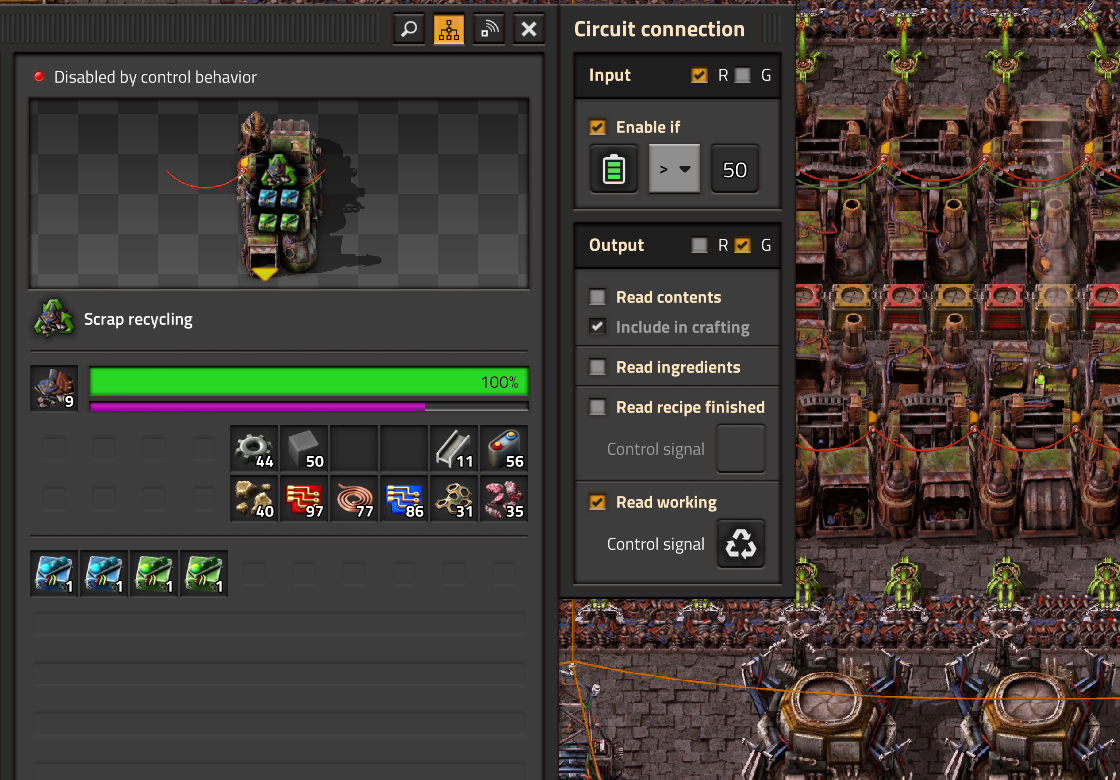
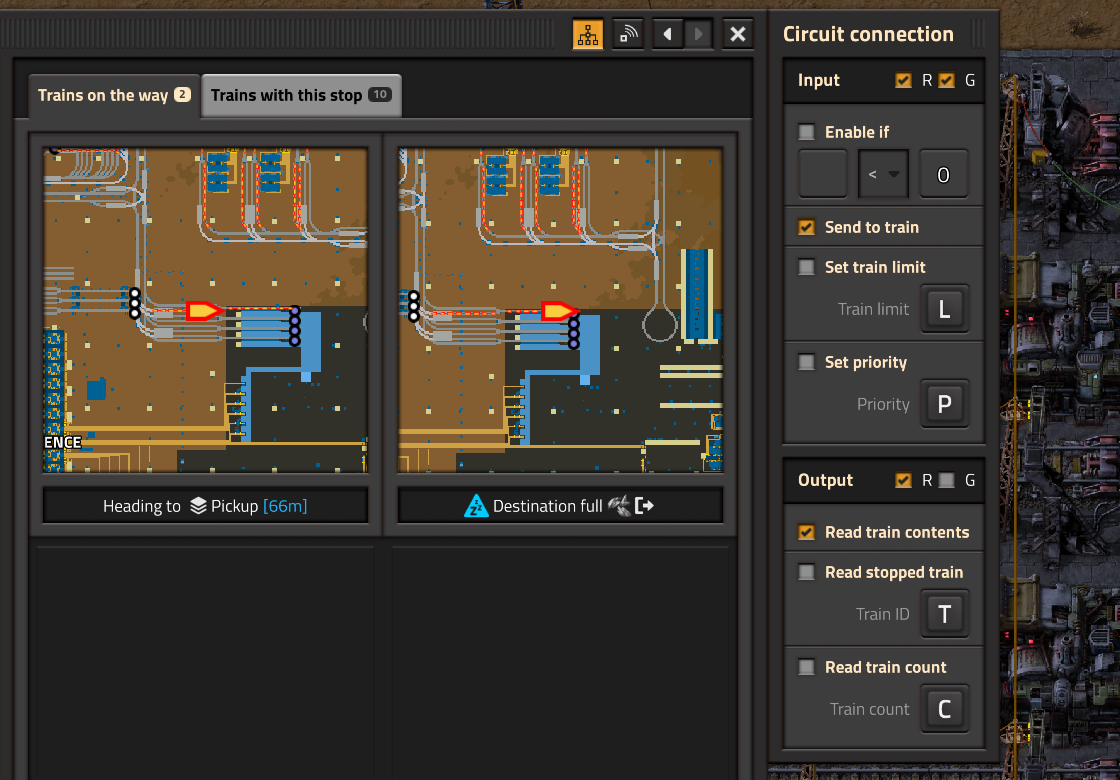
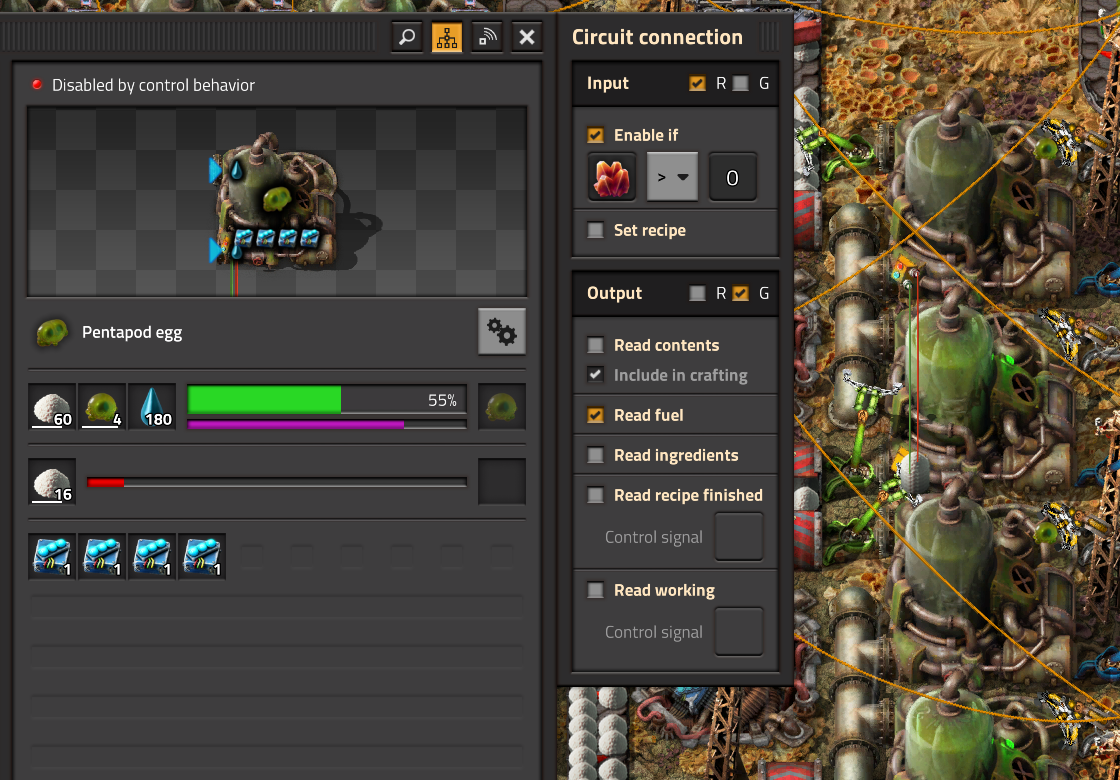
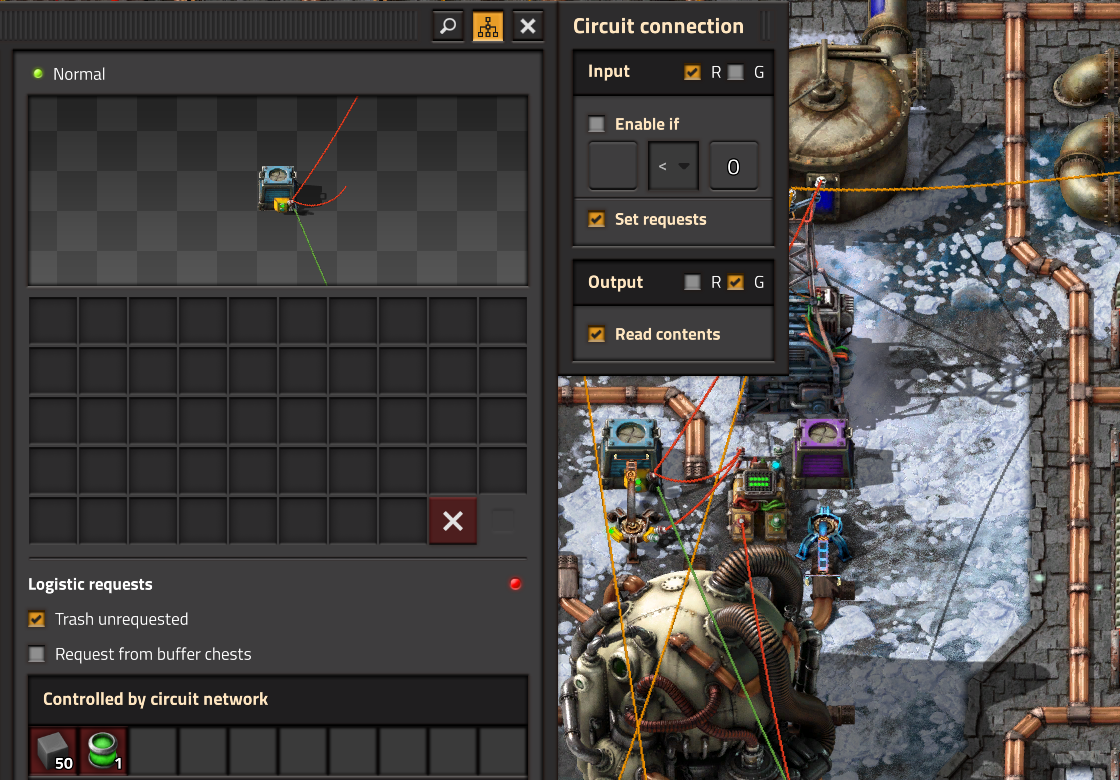
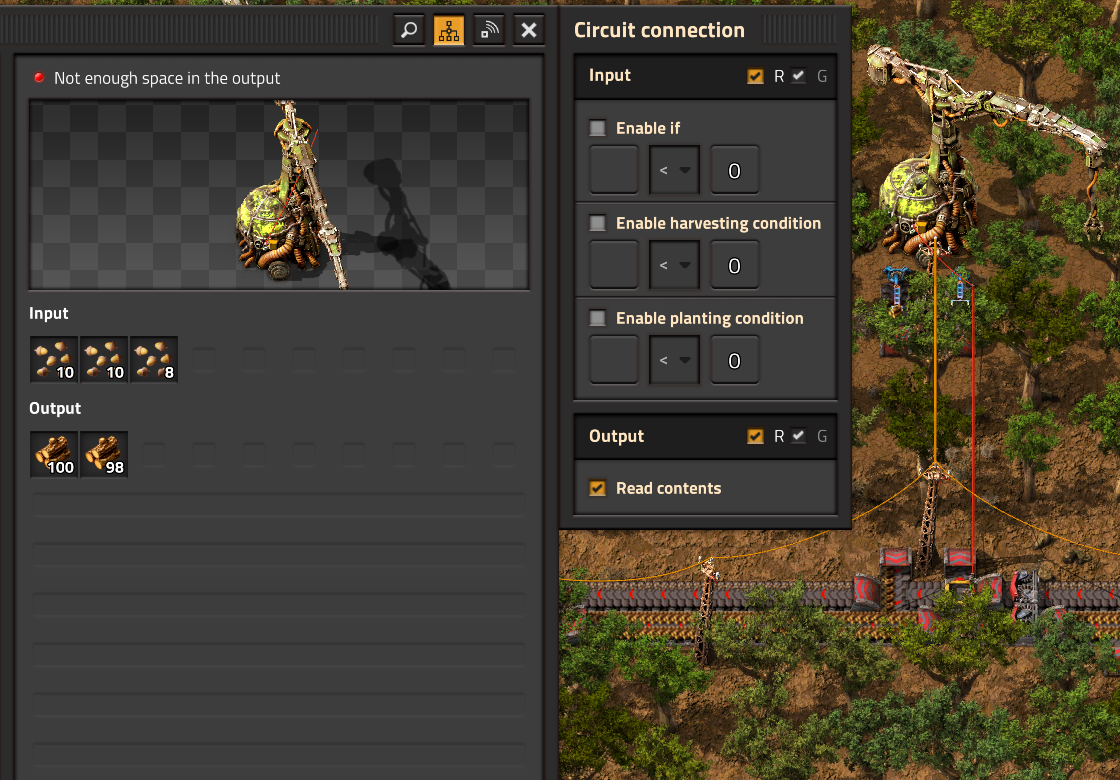
In the Circuit connection frame you can see the 'Input' and 'Output' frames with the checkboxes, these control which wire is used for all the connections in that frame. Hopefully it also makes it more apparent which connections are 'Reads' from the entity, and which are 'Writes' which affect the entity behavior.
With this change we decided it is acceptable to remove the signal self-subtraction after all, which unfortunately will break some 2.0 circuit setups (with assembling machines and asteroid collectors). Technically it is also an optimization, as the entities no longer need to update the network counts in the expensive way when their contents change, which furthermore allows us to give Requester chests the ability to 'Set requests' at the same time as 'Read contents'.
We had many requests to make some way to set research automatically. With Space Age it became a bit more useful when planetary deliveries of different packs would necessitate manual switching to optimize usage (especially with the Gleba juice).
We went through a few different iterations of the idea, feeling out the usage and feasibility, and I think we settled on a reasonable design.
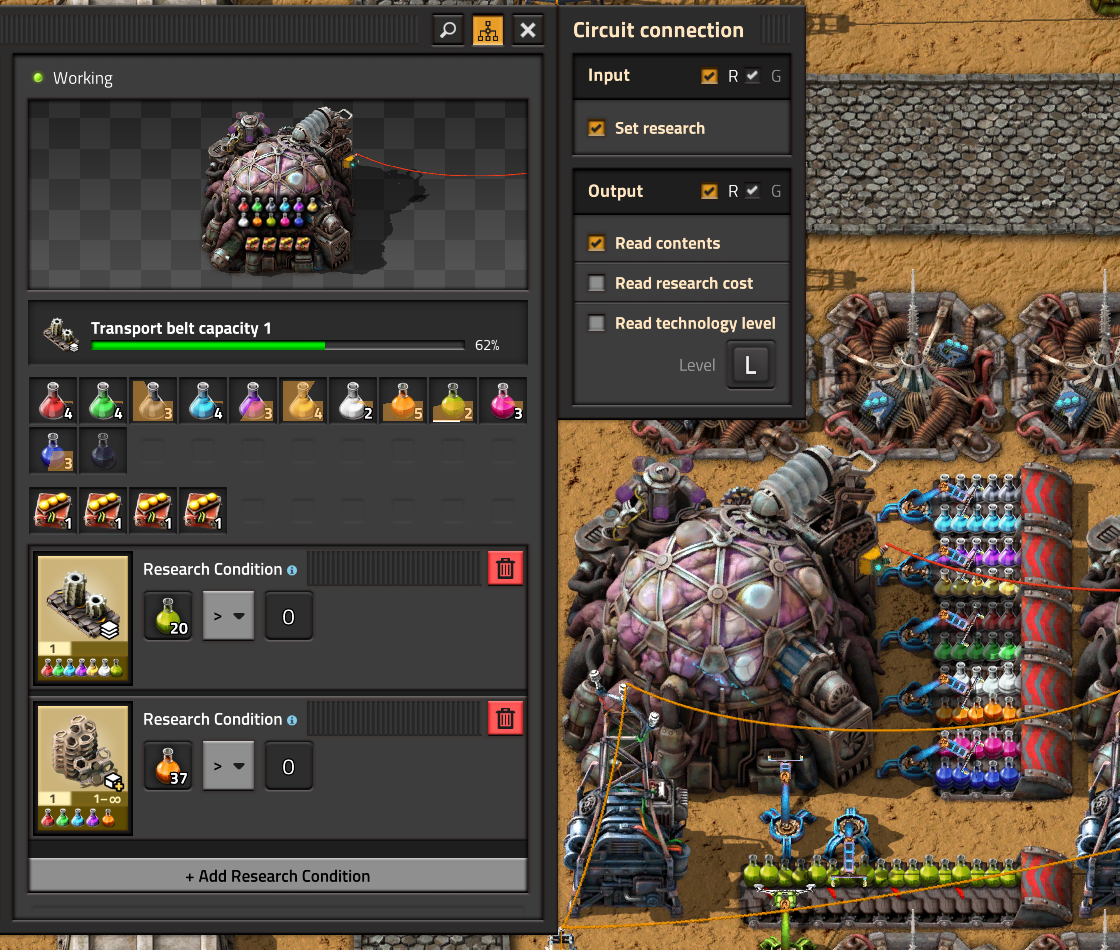
The way it works is similar to the display panel:
If you have a Lab setting the research, players will be blocked from using the research queue, with a notice about why it isn't possible:
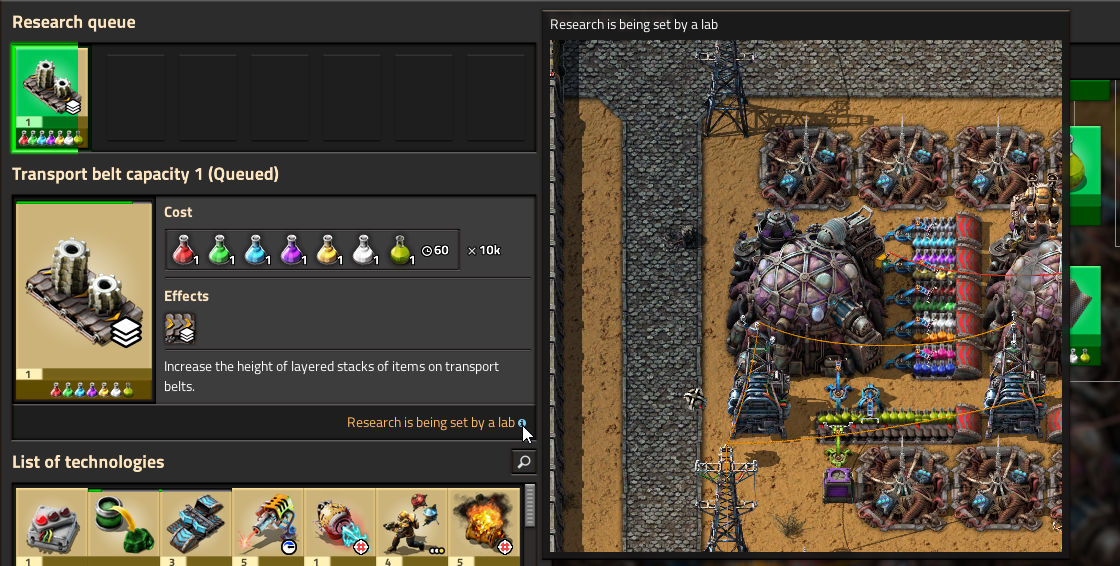
The label will show the camera tooltip on hover, and clicking it will open remote view at the location so you can quickly find the lab and adjust things. Other than that you can still browse and use the Technology GUI in the same usual way.
When items arrive on a planet into a landing pad, there are a few categoric ways to unload them.
When the traffic increases to the point you want to unload into trains, you eventually get to a state where you're placing roboports everywhere you can to meet the charging demands. At that moment you probably think there should be a more straightforward way.
Initially we thought we would specifically make a train loader, which is what Earendel prepared concept art for.
However, when Jaroslaw was in the process of making the graphics, we hit some severe issues and luckily this made us re-evaluate.
We realized simply allowing inserters take items out of it bypasses all of the weirdness, and instead feels much more Factorio-like as you can then use it to unload into any kind of entity inserters can interact with (train, chest, belt, ...).
We took inspiration in Earendel's concept art of the initial idea of the train loader, and adapted it to something quite different.
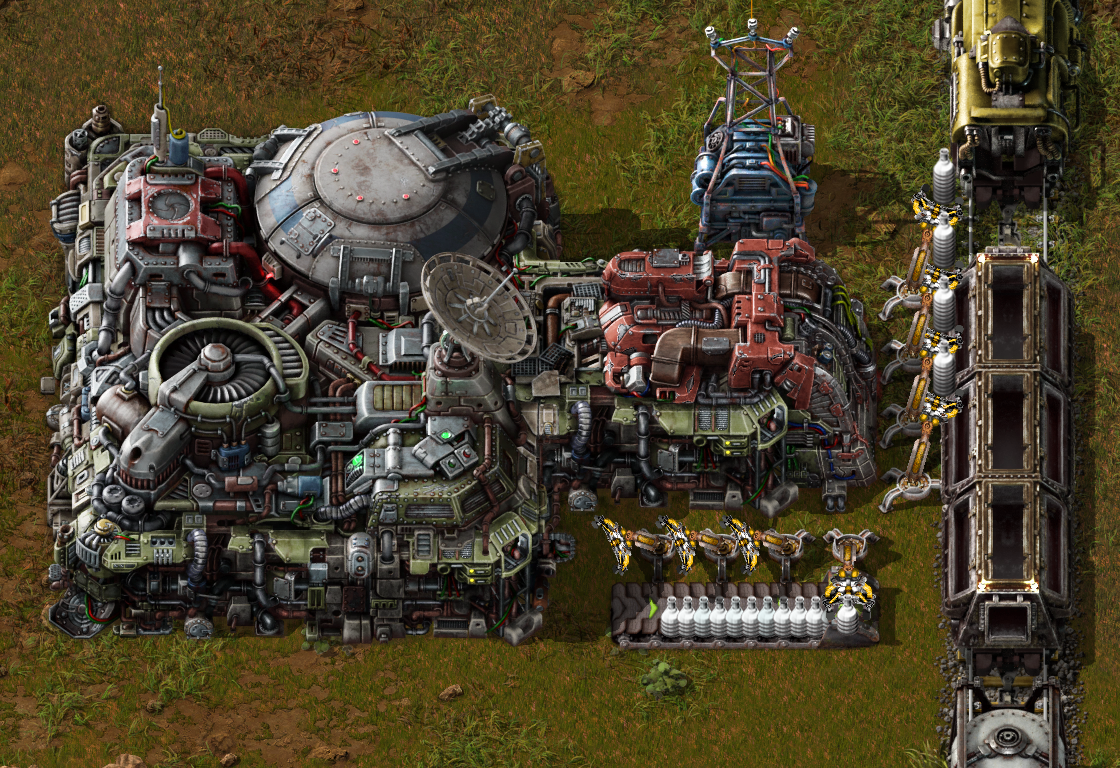
The Landing pad unloading bay is a special form of cargo bay which allows inserters to take items out of it.
While I was trying to help, Jaroslaw still had to figure out a lot more of the design than usual, given the deadline was getting crazy close considering the complexity of this entity, he's done great!
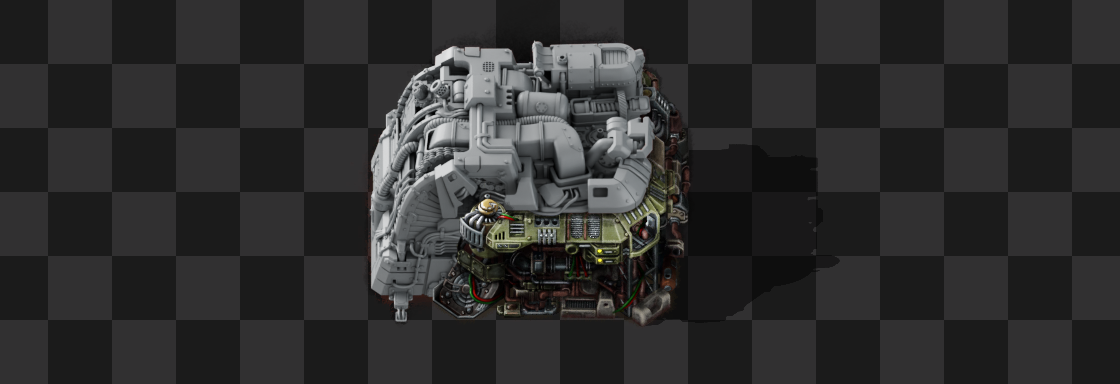
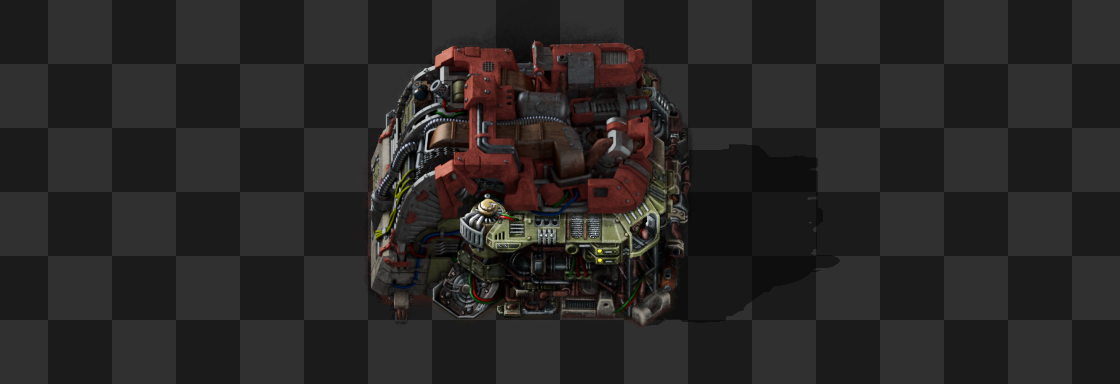
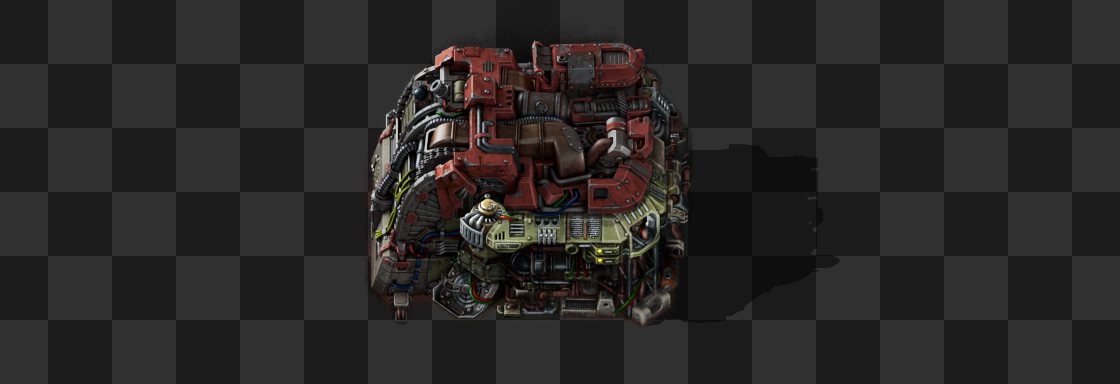
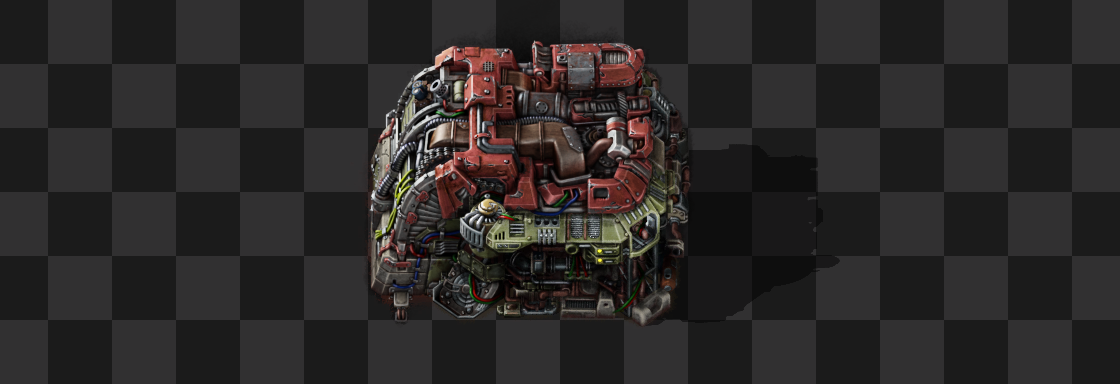
A sneak peek into the postprocess that we rarely have space in the blogs to show. Jaroslaw says hello. :)
The entity size is strangely enough 4x5 tiles, specifically for a 1-tile gap between the cargo bay 2x2 grid and the rail 2x2 grid.
We didn't want to allow unloading just anywhere, so there are limitations. It can't be constructed on space platforms, and on planets there is a limited area around the landing pad where the unloading bays can be placed.
We view the logistic belt puzzle as integral part of space platform construction. The hub can be used to input/output items from it and for example sort asteroid chunks and their products that way. It's great this option exists, but it's under the condition that it doesn't scale and larger platforms need to simply use belts. Allowing the unloading bay on space platforms would change this too much so we prefer to keep it away from platforms.
On the planet side, there is no limit to how far you can walk cargo bays. Without the area limitation, you could just make a suuuper long chain of cargo bays, and put an unloading bay at the end to just "transport" items all the way from landing pad to a lab cluster, for example.
As a semi-related change, we are allowing players to build elevated rails over cargo bays. We didn't do it before because it seemed like the cargo pods would collide with the rail so we treated it as a "tall" entity, but allowing to cross the cargo bay chain is so convenient that we decided the cargo bay will turn off its cargo pod receiver instead - which will be barely noticeable with how many cargo bays you typically need to build.
This is using about half the allowed range.
The biggest resulting caveat is that the allowed range is a flat number of 59 tiles. It doesn't scale with technologies or quality. Factories can vary in size massively so it's difficult to find a value that would fit everybody, but we can always tweak it in the future or add some kind of scaling.
That's no moon. It's a planet!
Having planets appear in the backdrop of space platforms is something that has been on my task list since way before 2.0. In the end, the development of the cargo pod animations took up all my time in the weeks leading up to release. We didn't want to release a half measure solution, so as a relatively speaking nice-to-have feature, it took a back seat.
Quickly though, modders stepped in to fill the planet-shaped hole in our shared craving for fancy visuals and released Visible Planets in Space Mod. I was secretly hoping I could borrow some ideas from their implementation, but in the end I wrote the arrival and departure code in my own way anyway.
Since the bar was set and, judging by screenshots, plenty of people had enjoyed the modded planets, I wanted to do a bit more than just "put the mod into the game". At the same time I was aware of the numerous custom planet mods which will probably be eager to use the feature too, so asset authoring couldn't be made too complicated either. I set about working with Fearghall to find a solution, who will explain what we settled upon.
Like with the asteroids (FFF-411), using sprite animations for this was out of the question because the slow rotation would require thousands of frames. Hrusa very smartly implemented some code to make a simple square into a 3D ball, and implemented some real-time lighting. He then passed this to me to take a pass over the shader and texturing. I tweaked the lighting slightly to include some atmospheric effects, and started working on a method to have animated clouds that wouldn't be too resource expensive. I settled on running a flow-map, so all the clouds on the planet are a single texture which is distorted according to another texture, rather than an expensive spritesheet.
Now for the textures! Technically any texture can be mapped to this "sphere", but they pinch around the poles because that's the nature of mapping a flat image onto a round object. This was a headache for a while, but we ended up figuring a way around this by re-projecting uvs of one sphere to another, and baking the textures at the poles to hide the distortion. It makes authoring textures slightly more challenging, but we think the effect is worthwhile!
Finally, there was the issue of the Fulgora lightning. Once again, a big animation here is far too costly, so Hrusa and I came up with a system of scattering quads around the sphere which run a short animation, then re-spawn at another location. The final product of all of this is a real-time lit sphere with capacity for PBR maps, animated clouds, and a lot of tunable parameters for mods to do crazy things with! Quite a feat!
In order to implement the pump to fluid wagon connection we added in 0.15, the pump got super complicated.
It already had many animations for many different combinations where the fluid wagon could stop (6 tiles, 2 sides, 2 directions, many frames, several layers). But still, after all that effort that Albert went through, the logic was limited to only connect pumps to fluid wagons which are aligned Just Right. And as the FFF mentions, some aspects of our trains are cursed, so if you do anything out of the ordinary, the fluid wagons are not aligned right at all.
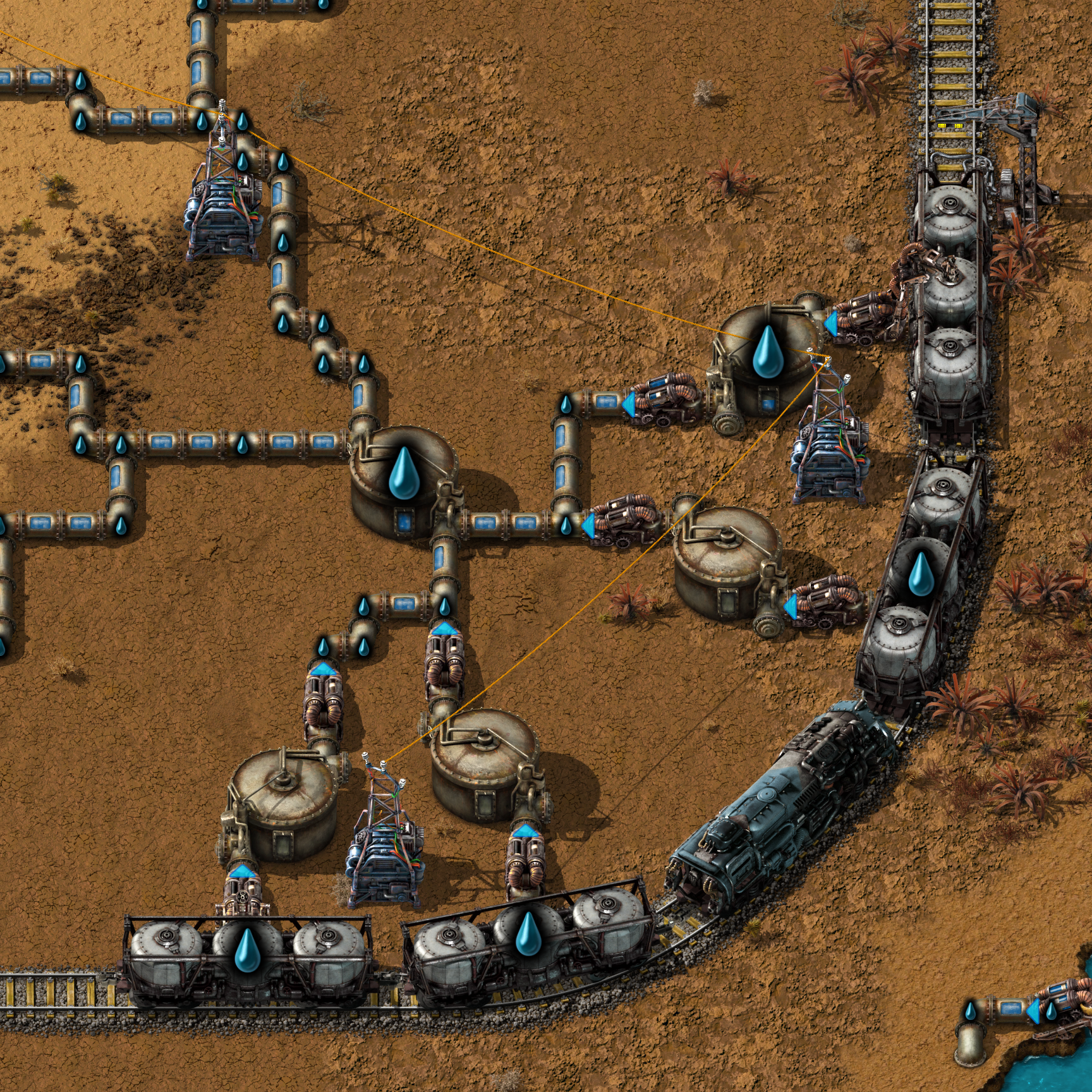
As you can see, only the first fluid wagon can be unloaded, even the last one is treated as misaligned.
We have been aware of this problem for years, but you could avoid it just by "building proper straight stations like a good citizen". And the dread from just thinking about reworking the crazy amount of animations, or throwing away the existing ones, was ... truly dreadful.
However, over time we have added entities which required better and better ways to manipulate sprites, like Spidertron, their technical siblings Pentapods or the Agricultural tower. With technology like that, perhaps the pump could be approached in a different way...
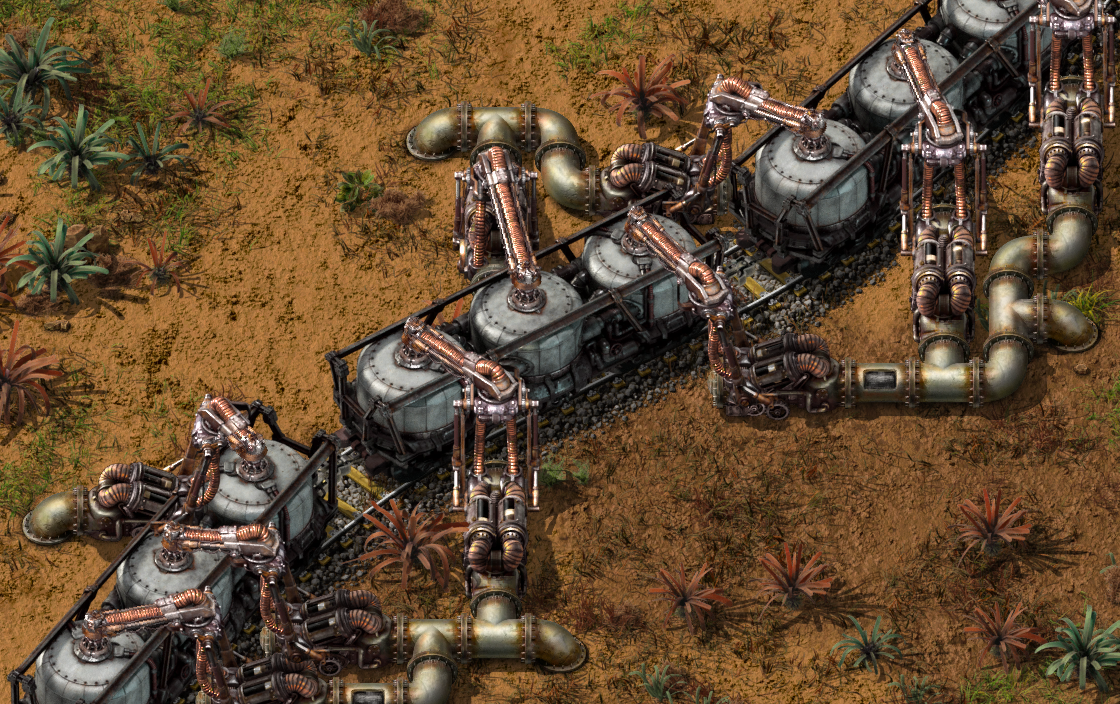
The new pump is using a new stretching arm which is much more flexible.
Earendel took the existing pump and tried to adapt its concept to split it into a classic and stretchable part. Jerzy then took the idea and implemented it with a level of camera hacks only seen in pentapods and agricultural crane.
This allows the pump to connect to a fluid wagon no matter how cursed your station design is always.
All of the pumps happily latch now.
When Lou was refactoring the code for pump connecting to a fluid wagon, we couldn't help ourselves but observe that perhaps one new situation could be made possible:
What you are about to witness may not seem entirely legal, scroll any further at your own peril.
While we of course didn't have time for reworking the pump before 2.0, this was one of the topics we knew 2.1 has to include for sure. From now on, fluid wagons and spaghet should get along better than ever before... and hopefully our bug forum should be free of wagon to pump connectivity issues.
In the Space Age, crafting machines' graphics have been getting more intricate and have more moving parts than ever. On the other hand... the oil refinery is almost completely static. To add to the woes, some of the rotations could be improved and the texturing already barely survived the last attempts to update it to high resolution back in 0.15.
With 2.0 out the door, it felt like a good time to bring it up to par with the rest of the Space Age machines, so Earendel and Jerzy embarked on a journey.
The design is a faithful evolution of the original, the refinery is still a tower with a ring surrounded by secondary towers, pipes and tanks. Just now all of the elements are following the level of detail that other Space Age entities have. As a bonus, there's now pipe windows with fluids which adapt color based on the recipe.
Over the years, we have updated and reworked many of the entity graphics. The vast majority of them were straightforward, but the assembling machines were the most elusive.
Several times Albert entered the same river figuring out the new concept, and I'm pretty sure they were in the back of his mind even when we were working on other topics.
The assembling machine is one of the visually most representative entities of what Factorio is, so the stakes feel like they can't be any higher. The concept represents stages of technology, crafting / production, engineer's ingenuity to put stuff together, and much more.
In the end, the assembling machines are so important and so all-encompassing that we never quite finished them even if we started multiple times.
Given that 2.1 is a version where we try to catch up on things we wanted to do but didn't have time for, assembling machines were high up on our list.
We went with somewhat conflicting goals - we wanted to be very conservative with the original design, yet emphasize the progression between tiers. Earendel made concept art for all of the tiers, while carrying over the spirit from earlier Albert's designs.
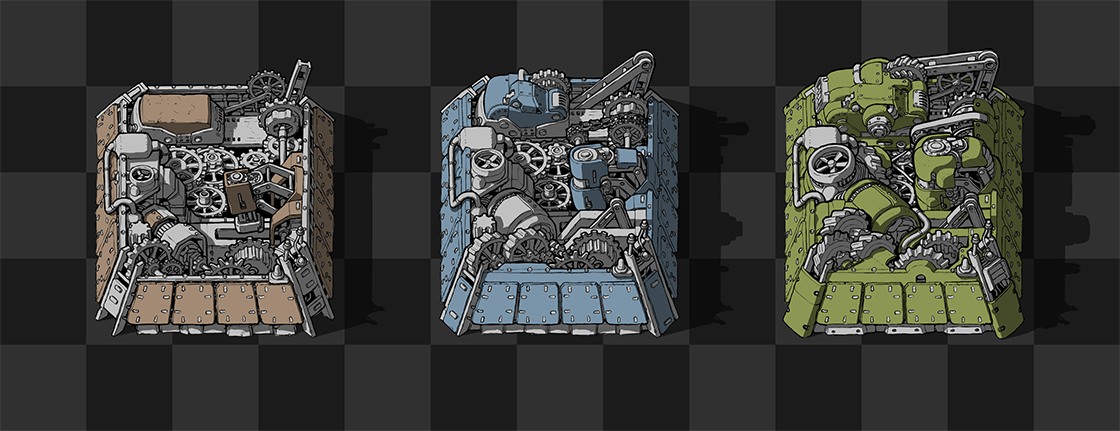
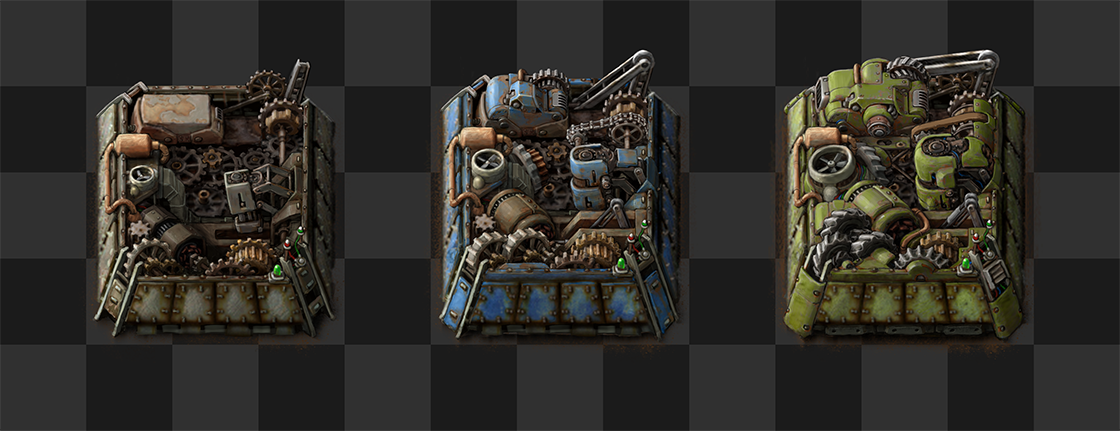
The concept art for the assembling machines is the last task I had the pleasure to ask Earendel to make.
Based on the concept, Jerzy then created the final graphics. As you can see, the concept has differences in many areas. A lot of the elements had to be moved around for them to fit in the 3D space.
While Albert's initial concepts and designs, Earendel's concept art and all the aspects of Jerzy's graphics production were doing the heavy lifting, the assembling machines also became a topic of all of us artists weighing in and discussing them for many hours.
We believe the results speak for themselves, may you enjoy looking at them in the years to come!
We are really happy to have you all on this journey with us, and we hope you will all enjoy playing 2.1 next week.
