Inserters are now smarter Twinsen A few days ago I was investigating a rather minor bug report related to "Rotational Asymmetry in Belt/Inserter interactions" (aka Inserter was not behaving identically when rotated). This was a classic case of floating point equality comparison. The Inserter would move it's arm and then it would pick up the item if the current arm orientation is equal to the desired arm orientation. Because of some chain of calculations related to rotation, some precision was lost and the equality check would fail for 1 tick, delaying the item pickup for 1 tick in some Inserter rotations. So I fixed that by finishing the inserter movement if it's close enough. Now the inserters should be a tiny bit faster in some rotations, plus all rotations should again be symmetrical and identical. While analyzing the code and Inserter behavior for that bug, I also noticed that inserters with stack bonus would do nothing for 1 tick after picking up an item from a belt. I changed it so inserters will start moving to a new target immediately after they pick up something. This also sped up the Stack Inserter by a tiny bit. Both the speedups were enough to fix another bug that was often regarded by the other devs as "not a bug": A Stack Inserter was not fast enough to pick up all the items placed on a belt by another Stack Inserter. Furthermore, because of different timings, the amount of items a Stack Inserter would pick up would depend on how far that Stack Inserter was from the item source: We released the change on Thursday. Something strange was quickly discovered after release... From Nefrums speedrun stream. As someone from Twitch chat noted "Inserters are so fast now, they even don't care about the side of belt". Remember that I fixed the rotation problem by finishing the Inserter movement if it's close enough. Well, what ended up happening was what now the Inserter would stop 0.0001 degrees short of perfectly vertical. That was of course closer to the other belt lane so the item would be dropped there. Previously it was always dropped perfectly vertical, and the lane decision algorithm would choose the right lane. The fix was easy and it's probably released by the time you are reading this. So with everything fixed, inserters are now more consistent, predictable and intuitive, things that I think are important for a precise game like Factorio. Some situation might end up being slightly slower or will consume a bit more electricity, but generally inserters are now faster.

Hello, trains are one of our most favorite parts of the game. We already talked about the ways we improved rails (FFF-377), so its time to talk about how we improved the way you can control the trains that ride on them.
Hello Factorians, it feels like the warm spring here is making everyone more friendly here. Even the Factorio office seems to be brighter and happier place. Hard to tell if the reason is getting out of the dark multiplayer tunnel or the spring itself, but whatever the reason it is, it feels great.
Removing RTL language translations Wheybags I'm sorry to say that we have removed the RTL language translations (Hebrew and Arabic) in 0.17.20. Until this point we've had a half implementation of RTL languages, where the text is simply flipped when we download it from Crowdin. This 'works' for a decent proportion of things, but not nearly 100%. In order to attain the level of polish we want for the 1.0 release, we would need to spend a lot of time implementing proper support for RTL layouts. This just doesn't make sense for us given our current goals, and the proportion of our player base which uses these languages (less than 0.1%). We decided that instead of completely gutting the translations, we could leave them in for those who enjoy them, but not to offer them in the GUI as defaults. The languages will remain up on Crowdin, and the locale files will still be present in game, but there will be no option in the in-game language options dialog to choose them. If you want to use an RTL language, you will have to manually edit your config file to set your locale. Detailed instructions are available on our forum. What this also means, is that we won't be investigating any bug reports about RTL issues.

Sound design update Ian One advantage of switching to home working during the COVID-19 crisis is the ability to listen to the game using speakers rather than headphones, and this has proved useful in balancing the relative levels of the game. Val has also been getting to grips with Lua, and this has led him to working on attenuations, which have been proving problematic. For instance, we noticed that sounds such as the radar were getting cut off when you walked away from them, rather than fading out cleanly. I investigated and discovered we had a maximum environment sound limit of 15, by raising this to 50 we have eliminated many of these problems. But then the downside is that there are now more sounds playing and therefore more clutter to mix and balance. Pink squares indicate which sounds are active. Left: limit of 15 nearby sounds; Right: limit of 50 nearby sounds. Rseding has been working through the list of sound design programming tasks, for instance we finally have the sound for the artillery turret rotation integrated into the game (which was featured in FFF-252 quite a while ago). Real in-game footage of the new artillery sounds In other news, we have an updated concept for the transport belts. We listened to feedback from the community that they were still a bit too present and annoying. The idea of the new sounds is that they will drift into the distance a bit more and become unnoticed (until you try to fall asleep). More fun sounds include water splashes, electric and laser beams, more powerful weapons such as the gun turret and vehicle machine gun. And our old robot sounds have come back as additions. If all goes to plan, we will merge the sound changes into master very soon, and once we've done all our pre-release checks, release it to the 0.18 experimental. After that, I plan to spend time on UI sounds, and also balancing the overall levels to get them more in line with other games, which is trickier than normal given the lack of audio middleware. However we have also made some changes to the default sound settings that move us in the right direction.
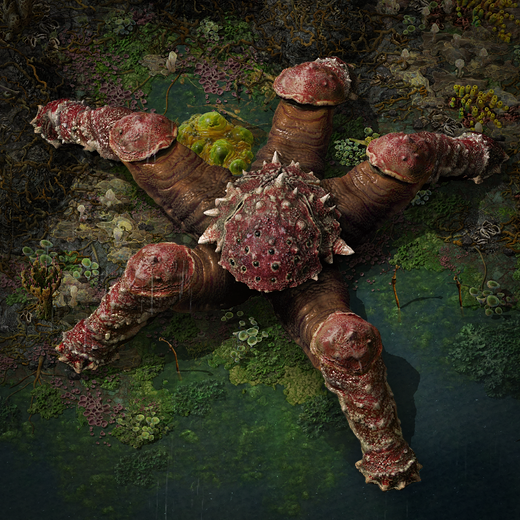
Hello, It is time. STOMPY TIME! If you don't want spoilers on enemies and want to discover them naturally then you might want to skip this one. Let's continue the story from FFF-413. A trumpeting scream quietens all the small animals. You hear the breaking of waves followed by stomping: earth-shaking steps that are getting louder and louder. Looking in the direction of the sound, you see a cliff rising to a tall hill. The fungus at the top shakes a little with each stomp, but the source is somewhere further behind the hill. You ready your weapons, but the sound stops getting louder and instead moves to the right, then gradually fades into the distance. Whatever it was, it was big. After climbing the hill to investigate, you see a valley on the other side. Some large translucent green eggs float on a raft of slimy foam in a pool of shallow water. You get closer. The eggs are soft like jelly, the portion above water sagging under their own weight. In the centre is a dark blurry mass of... tangled limbs and eyes. This video has sound. Also available on YouTube in 4k. Suddenly the egg erupts and a clawed limb swipes at your face. A strange creature wriggles around in the water trying to claw at you, and through the splashing you make out 5 limbs like a starfish. A bulging head-like structure has many eyes on one side and a sponge-like material on the other. On the sides of its head are crests of transparent blisters that are inflating with air to form something like a paddle or wing. It drags itself around like some sort of ravenous tentacled baby. With the occasional lurching movement it launches itself at you, trying to grapple you with its limbs and bite you with its underside. The claws glance off your energy shield with minimal damage. Your personal laser defence springs into action and in a flash of light the newborn is cut to shreds. The laser then switches targets to the egg raft. A few moments later all the eggs burst into a horrifying swarm of angry thrashing creatures. The sea of flailing limbs and odd movement makes it difficult to target individuals. You bravely retreat back to the cliff and equip the flamethrower to protect yourself with a wall of fire. The undaunted wriggling creatures run straight into the fire and die soon after. Another trumpeting scream pierces the sky but this time it doesn't sound distant at all. A slender towering creature stares straight at you with its large bulging eyes. It strafes sideways circling you, gracefully stepping over cliffs and tree-like fungi with its 5 thin legs. It launches something from its head, a projectile high into the air and arcing toward you. You start retreating, but 4 wings spring from the sides of the projectile and it steers towards you like a homing missile. The flying creature rams into you, grappling you with its clawed limbs and slowing your movement. You throw it down to the ground and it becomes indistinguishable from the Wriggler you dispatched earlier. Your laser defences make short work of it, but without warning, you're struck by another projectile creature from the other side. Another Strafer has arrived and is also bombarding you. Both Strafers are staying out of range of your automated laser. You dash towards one of the Strafers with your submachine gun in hand, but as you do the Strafer to your front retreats and the other advances. They seem intent on keeping you at range, constantly circling while flinging homing projectiles. No matter, you have another weapon up your sleeve. You dash forwards again, this time with a rocket launcher in hand. A rocket snakes its way through the air and blasts its way into the first Strafer. The creature shrieks and attempts to retreat, but another rocket is already on its way. The second rocket strikes unerringly and a moment later, the Strafer is blown apart leaving a cloud of pieces to rain down on the swamp below. Stomp stomp stomp. The stomping has returned. A colossal spiked shell rises into view from behind a hill. It strides effortlessly over a cliff with its 5 huge armour-plated legs. This creature is clearly related to the others, but it is far heavier with a wide stance and thick legs. The central body or head region is like a shielding shell with small eyes peering through narrow holes. You fire some rockets at the Stomper and they do some damage, but nowhere near enough to take it down. You have very few rockets left and they won't be enough to kill the Stomper so it's better to save them for the other Strafer (which is difficult to catch otherwise). The Stomper charges towards you. Even with your exoskeleton equipment the Stomper can outrun you. You stand your ground with the submachine gun but you can't dodge effectively while you fire. As it gets close the tremors stress your shield, and thrown debris from its stomps pummel the shields further. The creature lands a foot directly on you and your shields falter. That hurt. This isn't working. You start moving again, not to outrun it but to outmanoeuvre it. It may be faster than you in a straight line, but it can't change directions as quickly. The other Strafer is still alive and flinging new enemies at you from a distance. By switching between dodging movement and bursts of SMG fire, you're able to evade most of the Stomper's damage and keep the number of Wrigglers low enough to not get overwhelmed. You wait for an opening when you're not being stomped on, swarmed, and the Strafer is in view. Away go the last 2 rockets and... success. The last Strafer falls dead. Now it's just you and the Stomper. A duel to the death. While continuing to dodge its feet, you make your way to a larger area of land to make your last stand. No more rockets. Gun ammo is low. Time for the flamethrower to shine. As you circle each other, you douse the arena in flames. The dance continues in flames until one of you falls. More fire, more spinning, more fire! The world becomes a hazy blur of flames, smoke, and death.
Hello, 0.12 will be stable soon, so is a good time to start making you want things from 0.13 right? :)
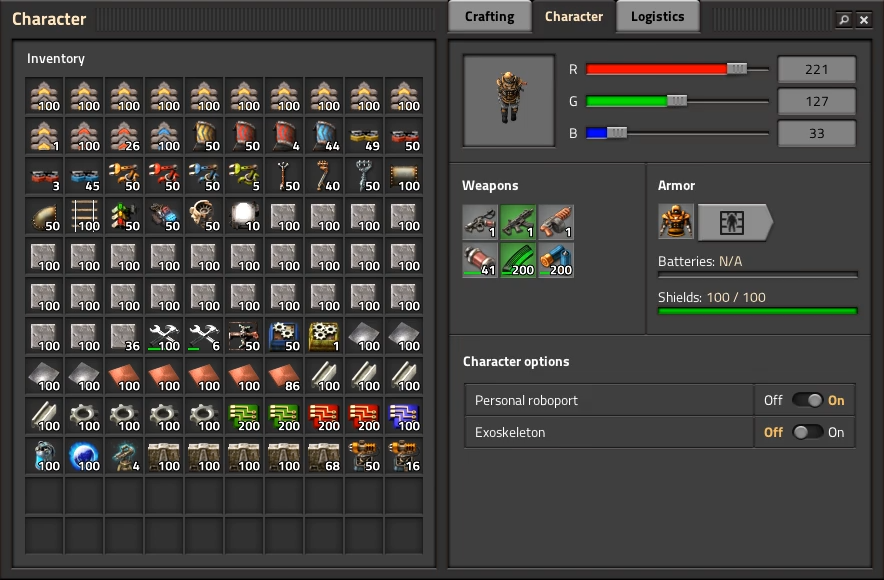
The Character GUI Twinsen It was 11 months ago when we first mentioned the new Character GUI, in FFF-289. After all that time, it's finally getting ready. Since you can expect to see it released sometime in the next 1 or 2 weeks, we would like to present a quick recap of the features and changes, and some real in-game screenshots. The Character window is now split into 3 tabs. Logisitcs and auto-trash were moved from the central frame into a tab and a new tab called Character was added. Using inventory/stack transfers in the player inventory will transfer the items either to weapons and armor slots or to trash slots depending on the selected tab, regardless of item type. Logistics and auto trash are now merged into 1 panel. Using a double slider you can set an interval. If you have less than the first value, robots will bring more, if you have more than the second value, extra items will be auto-trashed and taken away by the robots. The double pop-up and extra confirm might seem strange, but it's made this way to solve the problem of robots bringing you items before you finished setting up your request. With the merging of requests and auto-trash, we also made it so you can now set an unlimited number of requests, regardless of research. Furthermore, everything is unlocked in one research: unlimited logistic requests, auto trash, and 30 trash slots are all unlocked by the "Logistic robotics" research that is at blue science. Searching now not only searches the recipe GUI, but also the inventory and logistic requests. By popular demand, we also added a switch to quickly turn personal logics on or off. Turning off personal logistics will stop logistic robots from bringing requested items. It will also stop items from automatically being moved to the trash slots. Logistic robots will continue to empty the trash slots. Since the recipe GUI has a new style, we also updated the look of the filter, item, circuit signal, and upgrade selection GUI styles. Some of the other GUIs in the game will have some visual issues due to the mix of old and new styles. My next step will be to fix these issues as soon as the Character GUI is released. Looking back, this GUI took 13 months and 3 programmers (working alternatively) to implement. This is excluding mockups and UX design. It's a long story, but one thing that's obvious is that the GUI scope has grown far beyond what our codebase is capable of. For this reason, we won't be focusing obsessing that much on the GUI in the future. We will finalize the transition of styles, fix obvious issues and low hanging fruits, and try to get everything at a consistent level of quality for 1.0. This new Character GUI and changes will likely affect some mods, especially those relying on logistic technologies, logistic slot related APIs, old style definitions, etc. Thankfully a lot of mods will be unaffected, so we hope it won't be too much disruption. Still, we wanted to give some forewarning.

Hello, The year is wrapping up, and we have been hard at work finishing off some topics before we take our Christmas break. As you can imagine, releasing any new version of the game without a few weeks to do bugfixing wouldn't be wise, so you can rest easy this holiday period without the worry of a surprise 0.18 release.
The new GUI tileset (Albert) The process of the GUI re-design is moving slowly but steadily. By making new mockups, re-thinking old mechanics, and with the proper feedback from a different range of people, the parts are falling into place. I'm starting to feel very confident with the actual general contrast and font sizes. Also the conversion from high resolution to normal resolution is working just fine. These subjects are very important to move forward with. Below you can see a demo of the current state of the new GUI. Not all the widgets are shown yet, but this document is helping us a lot in order to define the future elements. Seeing the big picture makes it much easier to tweak them altogether with a better coherence and consistency, not to mention for testing any kind of font, specifically non-latin characters sets, a subject that I personally have not paid too much attention to yet. This document is being used also to create the general tileset and see how it behaves in the engine. This is a work in progress, and we are tweaking details constantly. Many things will change during the process. Overall here you can see a sneak peek of the Factorio GUI to come. I want to also mention that we are actually taking care of the 8% of the population who has some sort of color vision problems. This subject is still very new for us, but we are without a doubt researching solutions to different conditions.
