Belt compression (kovarex) The decision of how to approach the belt compression in 0.16 was not an easy one, we were basically facing two possibilities: Splitters are the only way to reliably compress a belt. Compression is automatic everywhere (inserters, sideloading, mining drills). Non-automatic belt compression is kind of an nice example of emergent gameplay mechanic that I liked. It was not forced on players, but it allowed to get some extra efficiency if they cared enough. On other hand, the solution to the problem is kind of obvious, and having to use it in all the setups everywhere might add more repetitiveness than fun. So after some discussions, we decided to make compression automatic. But we weren't really sure how to do it. The problem is, that once the items are pseudo-randomly added to the belt, with lot of gaps not big enough for another items to fit, it is not clear how should the additional inserters compress it: The solution was, that whenever there is any gap bigger than the standard distance between items on a belt, item can be inserted there and for a (usually) brief moment, the items are squashed together closer than usual. But once the belt starts moving, the gap between the two squashed item extends to the standard size. This change required us to do some fundamental changes to the belt logic, which could introduce a lot of new problems, but since we just wanted this to be resolved in 0.16, we had to do it now. The result is, that the same setup in 0.16.25+ results in perfectly compressed belt: The belt mechanics are now easier to use, but the game also flows more nicely. The belt flow still needs to be controlled and belt balancers are still needed. As that feels to be the more interesting part of belt handling to me, I am happy with the final result.
Hello, on Thursday we received a belated Christmas package from our friends over at Steam: They definitely won't be lasting long :-).

Hello, We've had a lot of requests to talk about map generation. It's difficult to talk about map generation without first explaining noise expressions. From time to time we need to talk about noise expressions anyway because they are a critical part of the game, but I don't think we've ever done a good job of explaining what they actually are at a high level. We will a closer look at planet mapgen again in the future, but for now this will introduce the basic concepts and act as a primer for later.

Electric mining drill redesign Ernestas & V453000 The electric mining drill is one of the older designs still in the game, and we have had our eye on it for a long time as a candidate for redesign. We would have loved to rework the mining drill in 0.15 when we added high resolution graphics and the pipe patch for it, but we had many nuclear related graphics to do for 0.15, so we just did the necessary minimum and postponed the full redesign. Now was finally the time we could unleash Ernestas onto it.
Space science As you already know, in 0.15 we have reworked the science packs and added infinite science. More and different science packs make the game a lot more interesting. It reduces the complexity of blue science (which is great for newer players) while adding complexity later, and you now have to decide what to research first, especially with the more expensive game modes (which is interesting for advanced players), and infinite science adds something to do forever in the game. However, one of my biggest complaints about Factorio always was that the rocket has no purpose, even though it is being propagated at all the points as the final step of the game. It is said at the trailer, at the introduction of freeplay, and by being the most advanced research, everything seems like it’s the thing to desire, but when I launched it for the first time and seeing the victory screen, I was feeling like "And now what...". For me there is one main reason why Factorio is so awesome and why I can forget myself playing until 4 a.m., and that reason is the infinite loop of 'there is always a bottleneck', you always need to fix something, you have not enough power, or your production of a particular product is insufficient etc. When you launch the rocket, you escape from this loop because it doesn’t lead anywhere. As we can see, we have learned to take the rocket as a measurable resource sink to quantify the size of our factories, which is great, but I think it makes sense to us only because we got used to it, not because it made sense in the first place, or at least it didn’t to me. Now when 0.15 adds infinite research, I started to ask myself why would I launch the rocket at all, and I have seen many of you ask similar questions. To compare the two, the infinite science is also quantifiable as I can see the amount I produced in the production screen, it also has an interesting crafting recipe (rocket parts vs. all science packs together), and it is also an infinite resource sink. The main difference is, the infinite research is actually useful. This is where the space science comes into play. We now have a space science pack, obtained by launching a rocket. You get 1000 of these science packs per rocket, and every infinite research requires these science packs. Such a simple feature, but it closes the infinite game loop again. But of course in case you want to just launch rockets without worrying about science, you can still do that, just like previously. We have also added more infinite researches, so now apart from worker robot speed, combat robot follower count and mining productivity bonus researches, we also have all of the combative damage upgrades infinite (not shooting speed as that would get ridiculous sooner or later), however their prices increase exponentially to prevent it from getting too extreme. The rocket has to have a satellite in order to get the science packs (the rocket has to be able send back the discoveries, right?). The rocket silo now has an auto-launch checkbox so you can launch them automatically, and the launch is only going to happen when you insert satellite. So you can control the inserter with satellite to only launch rockets when you need the science packs automatically through circuit network. Of course we also added support for mods, so you can define what do you get from sending a rocket, and depending on what you put in the rocket - say, if you put a tank into the rocket, you receive 100 raw fish, because that would make perfect sense. We can build up on this concept in the future, but for now this already brings a lot of sense to the game as it is. As a bonus, here is a album of my factory where I tested the infinite science concept.
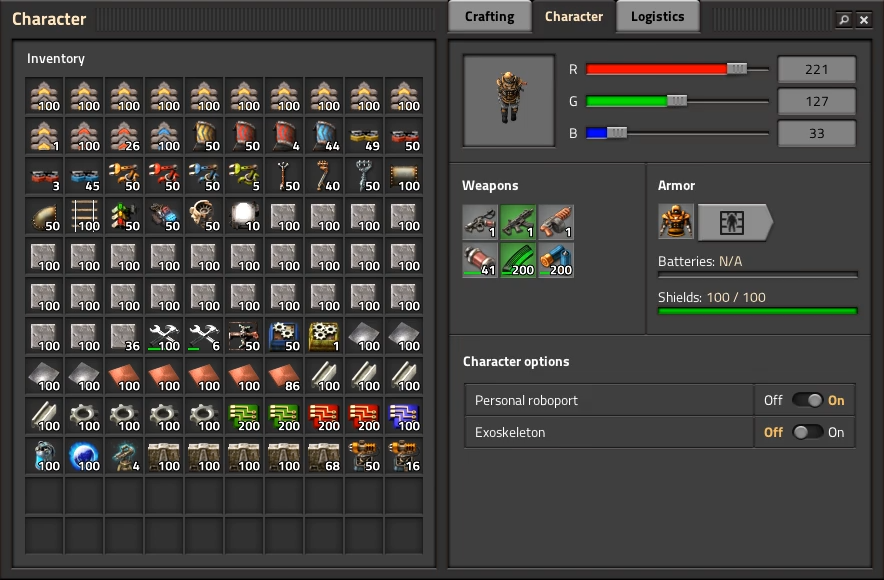
The Character GUI Twinsen It was 11 months ago when we first mentioned the new Character GUI, in FFF-289. After all that time, it's finally getting ready. Since you can expect to see it released sometime in the next 1 or 2 weeks, we would like to present a quick recap of the features and changes, and some real in-game screenshots. The Character window is now split into 3 tabs. Logisitcs and auto-trash were moved from the central frame into a tab and a new tab called Character was added. Using inventory/stack transfers in the player inventory will transfer the items either to weapons and armor slots or to trash slots depending on the selected tab, regardless of item type. Logistics and auto trash are now merged into 1 panel. Using a double slider you can set an interval. If you have less than the first value, robots will bring more, if you have more than the second value, extra items will be auto-trashed and taken away by the robots. The double pop-up and extra confirm might seem strange, but it's made this way to solve the problem of robots bringing you items before you finished setting up your request. With the merging of requests and auto-trash, we also made it so you can now set an unlimited number of requests, regardless of research. Furthermore, everything is unlocked in one research: unlimited logistic requests, auto trash, and 30 trash slots are all unlocked by the "Logistic robotics" research that is at blue science. Searching now not only searches the recipe GUI, but also the inventory and logistic requests. By popular demand, we also added a switch to quickly turn personal logics on or off. Turning off personal logistics will stop logistic robots from bringing requested items. It will also stop items from automatically being moved to the trash slots. Logistic robots will continue to empty the trash slots. Since the recipe GUI has a new style, we also updated the look of the filter, item, circuit signal, and upgrade selection GUI styles. Some of the other GUIs in the game will have some visual issues due to the mix of old and new styles. My next step will be to fix these issues as soon as the Character GUI is released. Looking back, this GUI took 13 months and 3 programmers (working alternatively) to implement. This is excluding mockups and UX design. It's a long story, but one thing that's obvious is that the GUI scope has grown far beyond what our codebase is capable of. For this reason, we won't be focusing obsessing that much on the GUI in the future. We will finalize the transition of styles, fix obvious issues and low hanging fruits, and try to get everything at a consistent level of quality for 1.0. This new Character GUI and changes will likely affect some mods, especially those relying on logistic technologies, logistic slot related APIs, old style definitions, etc. Thankfully a lot of mods will be unaffected, so we hope it won't be too much disruption. Still, we wanted to give some forewarning.
New sound design Val: Do you remember the smell of the fresh air near the seashore? Can you describe, a forest that rumbles its trees after a summer rain? All that you hear and see goes right into your mind. All of our senses are connected with each other in our memories. When we feel at least one of them, our imagination brings the others. Sometimes, and even often, we can't see the object, but we can hear it! You can't see the wind, but you feel it and hear it! The bird is singing. You can't see it hiding in a bush, but you hear a beautiful song and can define the direction it comes from. The forest, the sea, the desert... Night and day. Clanking of a loading cannon and snoring of unseen monsters. That is what we are planning to do. To put the unseen colors of sound and add some feeling of life to the planet of Factorio. Even the emptiness has it's own voice... Albert: As you probably know, we are in a stage of polishing all the possible aspects of the game. Last week we were cooperating with Val, our new sound designer, and we spent the entire week defining new concepts for environmental sounds and sound effects. Also we were working on the sound of the biter nests and the artillery cannon. This is definitely a huge subject full of details that can really improve the play experience of Factorio. Here I can show you a work in progress of the artillery cannon: We have to tweak some behaviour of the entity in order to make it act more mechanical, but overall, the possibilities that sound design can bring to the game are really interesting. Compare the simple shooting of the cannon in the actual version with this proof of concept with all those details in rotation and loading. Of course this level of detail complicates the work a little bit, but I'm convinced it's worth it.

Release plans Klonan This week we released version 0.17.79, and marked it stable. Internally we have been calling this 'Stable 3', and the main feature was the new tooltips we showed in FFF-318. There is one constraint we put on ourselves when we started this more swift feature release schedule: We want to avoid breaking mods. This is easy enough in principle, don't start renaming things, don't remove API features, etc. However as we develop further, there are certain features and improvements that we can't realistically do in a way that won't break mods, such as the new Character GUI (FFF-289), and color correction (FFF-320). It is for this reason that we are going to accumulate some of these mod breaking changes, and release them all at once. Since it will definitely be breaking mods, we will bump the major version number, so it will be 0.18.0. We have already internally started merging in these 0.18 features into our master branch, so we will not be doing any more 0.17 releases (unless something absolutely catastrophic is discovered).
Lua Mod GUI additions Rseding Mod GUIs have been an interesting part of Factorio modding since I started working at Wube. They allow scenarios and mods to add GUIs that look and feel like the base game. When someone new to Factorio modding is introduced to how they function, they almost always have the same questions: Why is mod GUI part of the game state? Why do mod GUIs need to be deterministic? How can I edit the base game GUIs? And then comes the explanation: The actual widgets are not part of the game state and are not deterministic. The part that mods have access to however is. In an environment where mods have to operate deterministically, if a mod is allowed to read some data that data must be deterministic. In that simple bit of logic; if a mod can read the checked state of a checkbox then that checked state needs to be deterministic. If the mod didn't have access to read that state it would need to store the last-known state and update it every time it got the changed event. Try to imagine that: every single mod implementing their own system for remembering last-known-state about GUIs they're using. Instead of leaving that entire mess to mod developers we decided long ago that we would manage that "last-known-state" for them. The basic data about what a given mod wanted to show on screen is recorded so mods can read and change it as they want and not need to be concerned with constantly updating it every time some changed event happens. Additionally it means that the game can use that "last known state" to restore what the player sees if they save, quit, and load the game. That still leaves the last question: "How can I edit the base game GUIs?". Using the above example it's much easier to explain that: as a mod - you can't. The base game GUIs are not implemented using this same system - they're just pure collections of widgets. None of the "last known state" is saved anywhere and it's all lost when saving, quitting, and loading. However, that leaves a divide: we need to implement each widget type through the "CustomGui" system in order for mods to be able to use them. With this latest release I finally figured out a way to do tabbed panes since they're special in how they work compared to everything else. Additionally I figured out a semi-friendly way for mods to put things directly on the screen in a way that the player can drag them around - instead of being limited to some fixed area (left, top, center, etc). Another system which I've been thinking about for quite some time is some way for mods to position GUI elements relative to base game GUIs. For example: a mod wants to add a pane which shows on the left of the character inventory GUI. Currently it's not possible - the base game GUI isn't readable by mods so they can't do anything with it. My idea is some system where a mod can say "I want to add this GUI, and I want it to be shown relative to the character GUI on the left side" and then any time the character GUI is shown it would also show the mod GUI. There are some critical parts to this new system. It needs to: Be easy to expand (either automatically works with all new base game GUIs or works with minimal effort). Not break with simple refactoring. Not cause other programmers trouble by existing. Not prevent base game GUIs from working how they need to work. So far none of it seems impossible. I don't know when I'll have it working, but I'm looking forward to what mods will do with it.
Hello dear biters and related species from unexplored planet full of life and natural resources. Recently I have been working on several high resolution graphics for your best friends - the tank and the player character. In this article I would like to show their updated visuals to you, as well as a sneak peek at how they are produced. The following text may contain traces of automation.
